Tuning a Local Coding Agent: Oh My Pi and Qwen3.8-27B on Two RTX 3090s
Update, September 23, 2026: the config below needs two changes for omp 18.2.7 and later. Custom Models in Oh My Pi covers them, along with setups for llama.cpp, SGLang, and gateways.
Running a coding agent at home 🔗
I’ve started to use Oh My Pi, usually called omp, a fork of the open-source Pi coding agent, with Qwen3.8-27B, an open-weights model that fits on consumer graphics cards. The server is vLLM on two used RTX 3090s.
omp’s defaults assume a large cloud model with plenty of capacity. On a home machine, settings like the thinking budget and the tool output limit decide whether the agent answers in 5 seconds or in 5 minutes. I spent a day measuring the traffic from my own agent sessions to find out which settings matter. Over the same kind of work:
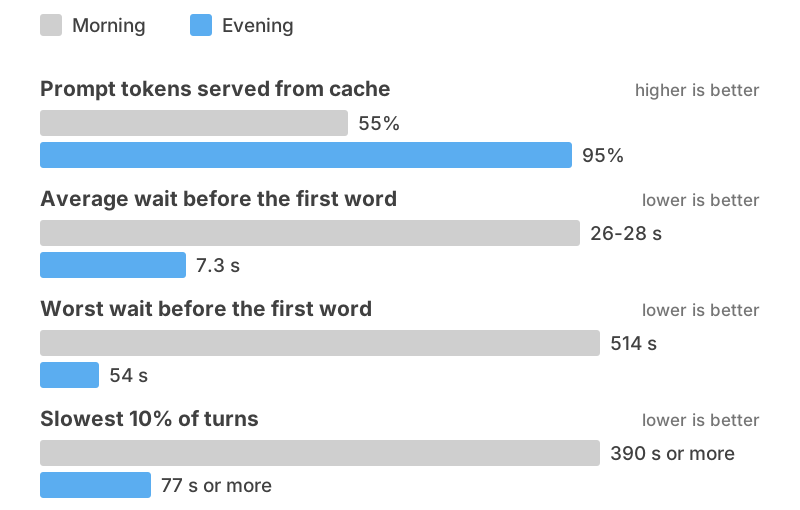
Most of that came from five omp settings:
- an explicit effort level on every role, so no request falls through to the model’s most expensive default
- a thinking budget of 6,000-7,500 tokens, sent as
thinking_token_budget maxTokensraised from 8,192 to 32,768 so file writes finish- tool output over 10 KB saved to a file instead of pasted into the conversation
- at most 4 subagents at once, and append-only context so the server’s cache keeps working
Local versus hosted models 🔗
Hosted means the model runs in someone else’s data center: Claude through Claude Code or the Anthropic API, GPT models through Codex or the OpenAI API, and the many providers that host open models. Local means the model runs on a machine you own.
| Local model | Hosted model | |
|---|---|---|
| Where your code goes | stays on your machine | sent to the provider with every request |
| What you pay | hardware and electricity, up front | subscription or per-token billing, ongoing |
| Limits | how much your GPUs can handle | rate limits and plan quotas |
| Model quality | good open models, behind the best hosted ones on hard tasks | the strongest models available |
| Speed on long conversations | slower, and sensitive to settings | fast, with the provider tuning it for you |
| Who keeps it running | you | the provider |
| Model changes | only when you choose | when the provider decides |
Local gives you privacy, predictable cost and control. Nothing leaves your network, and some employers and clients require that for source code. There is no meter, so an agent that spends an afternoon reading your codebase costs the same as one that answers a single question. No quota cuts you off mid-task, and you pick the model version and every setting, so the model’s behavior changes only when you change it.
The frontier models from Anthropic and OpenAI are much larger than anything that fits under a desk, and on long multi-step tasks the difference in quality shows. With a 27B model you get better results by giving the agent focused tasks and checking its work more often. Hosted models also respond much faster, and the gap grows as the conversation gets longer. My setup writes replies at 54-60 tokens per second when one request has the GPUs to itself, and 21-37 per request when several agents share them, depending on how many are running and how long each conversation is.
Running locally still costs you the graphics cards, the power they draw (mine are limited to 400 W and 450 W, so 850 W for the pair under load), and the hours it takes to learn how inference servers behave.
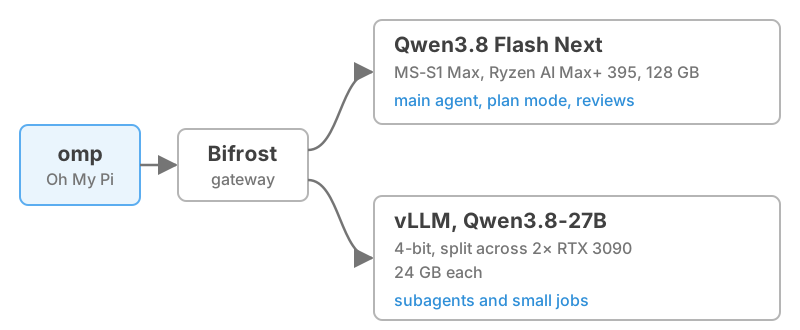
omp can also mix the two by sending different jobs to different models, so a hosted frontier model can do the planning and the hard reviews while a local model runs the subagents that read files and make routine edits. My own setup splits jobs the same way, except the bigger model is Qwen3.8 Flash Next, the larger model in the same family, which handles the main agent, planning and reviews.
I run Flash Next on a Minisforum MS-S1 Max, a Strix Halo mini PC with a Ryzen AI Max+ 395 and 128 GB of unified memory, served by Halogen, an inference engine written for that one GPU and this one model family. Halogen is closed source for now. It prefills at about 1,400 tokens per second and decodes at about 40, and a follow-up turn on a cached conversation starts in under 2 seconds however long the conversation is, but there is no way to patch or audit it. (A clean-room reimplementation, chlorine-server, covers the 27B model but not Flash Next yet.) That machine deserves its own post. Everything below is about Qwen3.8-27B on the 3090s.
Prefill, decode and the vLLM prefix cache 🔗
A language model has no memory between turns. Each time you send a message, the server hands it the whole conversation so far: your instructions, the tool definitions, every file it opened and every command output. The model works through all of it before it can say anything. That first pass is prefill. Then it produces its answer one token (roughly a word fragment) at a time. That is decode.
Picture someone who has to reread a long email thread from the top before answering each new message. Prefill is the rereading and decode is the typing. On a home GPU, prefill is the slow part. My setup prefills roughly 700-900 tokens per second for a single request, and an agent’s conversation often reaches 100,000 tokens or more. Prefilling all of that from scratch takes one and a half to three minutes.
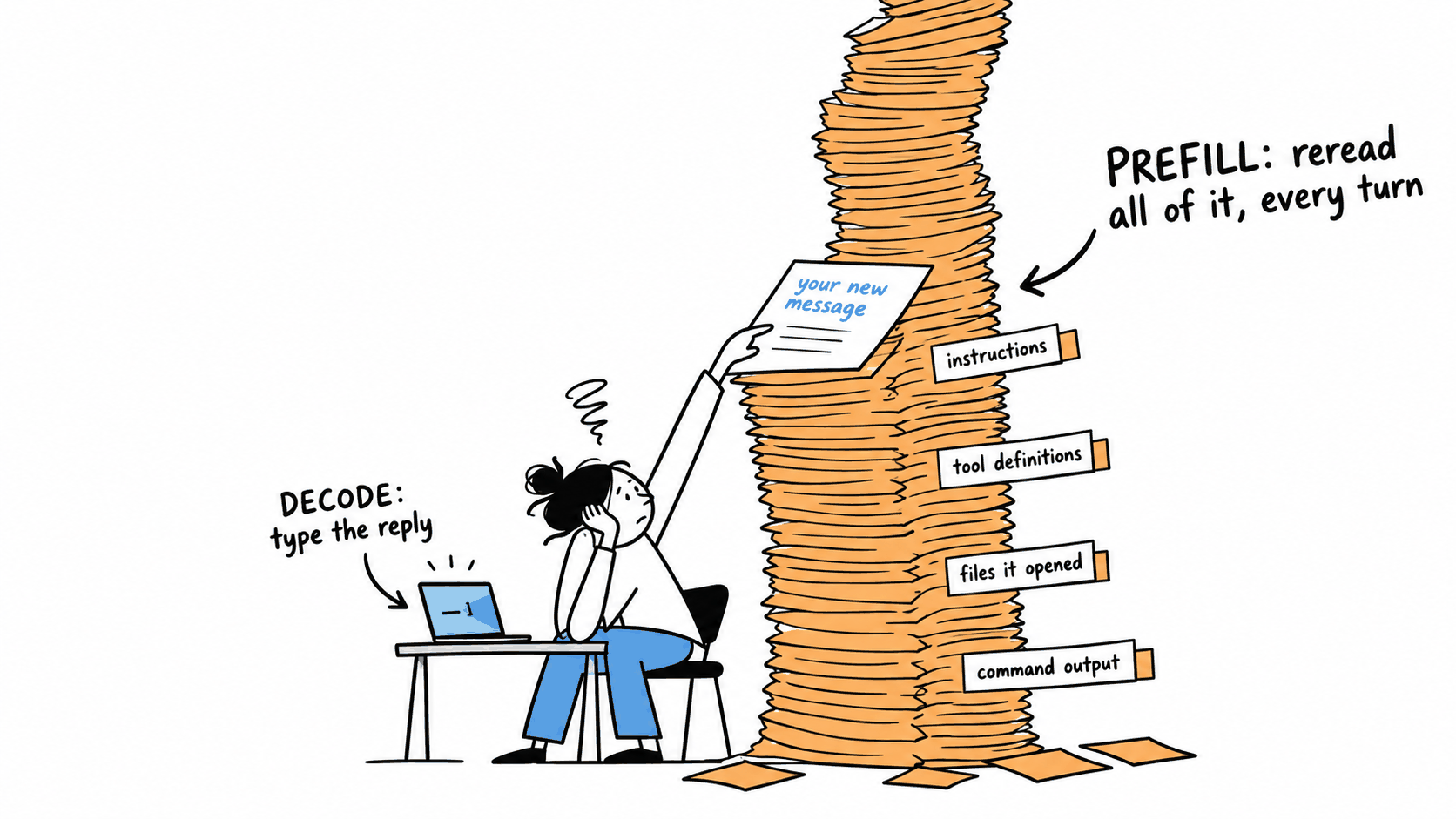
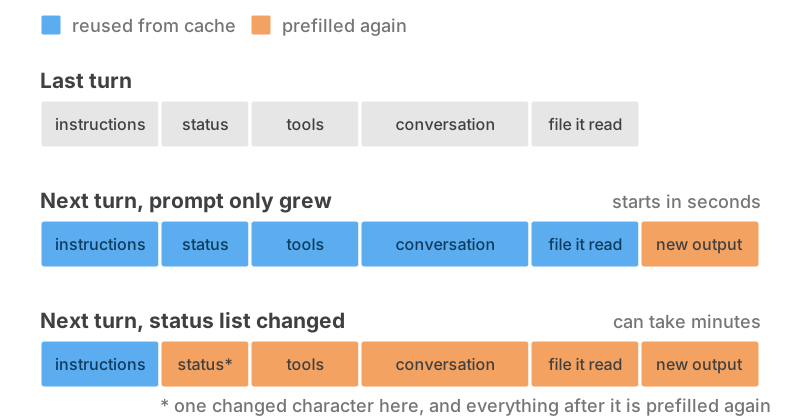
A prefix cache avoids most of that work. The server keeps what it already computed for the start of the conversation, so if the next turn begins with exactly the same text plus a few new messages, it only has to prefill the new part. A turn that hits the cache starts in a few seconds, and one that misses can take minutes. Much of my tuning went into keeping that cache working.
At the start of my day of measuring, the server was taking 55% of the conversation from its cache, and the agent waited 26-28 seconds on average before the first word of each reply, with one turn waiting 514 seconds. By the evening it was 95% from cache and 7.3 seconds on average. Some of that came from server changes, but most came from settings on the agent side, which anyone running omp can copy.
The prefix cache is also why I run vLLM rather than llama.cpp or Ollama for this job. vLLM serves several agents at once from one copy of the model, keeps a large prefix cache across them, and accepts a per-request thinking budget.
Choosing an agent for a local model 🔗
The agent is the program you talk to. It turns your request into a conversation with the model, runs the tools the model asks for, and decides what goes into every prompt. Most agents can talk to a local model one way or another, but they differ in whether that’s supported, how much setup it takes, and how much control you get.
| Pi | Oh My Pi | Claude Code | Codex CLI | OpenCode | |
|---|---|---|---|---|---|
| Made by | Mario Zechner / Earendil | Can Bölük (fork of Pi) | Anthropic | OpenAI | Anomaly (makers of SST) |
| License | MIT | MIT | proprietary | Apache-2.0 | MIT |
| Other models officially supported | yes | yes | no | no | yes |
| Local OpenAI-compatible server | built in (models.json) |
built in (models.yml) |
env vars plus a proxy that speaks Anthropic’s format | env vars or config plus a proxy that speaks the Responses API | built in |
| Subagents | not built in, by design | yes, in parallel | yes | yes | yes |
Pi, the minimal original, keeps the core small on purpose, with no subagents and no MCP, and expects you to add
what you need with extensions. Local models are built in: a provider entry in ~/.pi/agent/models.json, with
compatibility options aimed at servers like vLLM and at Qwen’s thinking format, plus an official guide for
llama.cpp. If you want something small that you fully understand, start here.
Claude Code and Codex CLI are built for their makers’ own models. Anthropic’s docs say they don’t support routing Claude Code to non-Claude models, and Codex’s reference docs say the Responses API is the only supported wire format. Both can be pointed at a local server through environment variables and a proxy that translates the request format (vLLM speaks both formats itself), but expect some features to break and no support from the vendor. If you already pay for one of them, use it there, and treat local use as a workaround.
OpenCode is an open-source terminal agent with built-in support for OpenAI-compatible providers, per-model context and output limits, subagents, and language servers you can switch on. Its docs warn that only a few models are good at both writing code and calling tools. Cline (VS Code and JetBrains) and Goose (desktop and command line, now under the Linux Foundation) also work with local models.
Oh My Pi’s features for local models 🔗
omp takes Pi’s local model support and adds the features Pi leaves out on purpose: parallel subagents, MCP, language server and debugger integration, and a long list of providers including Ollama, LM Studio, llama.cpp and vLLM. The features that mattered for this post:
- The model entry in
models.ymlsets the context window, the maximum reply length, the effort levels the model understands, and extra request fields for server features like a thinking budget. - Roles let each job use its own model and effort level. There are nine, including the main agent, plan mode, a slow reviewer, general subagents, and small jobs like titles and commit messages, so cheap jobs can run at low effort on the local model while hard ones get more thought or go to a hosted model.
- Tool output over a size you choose is saved as an artifact, with only the beginning and end kept inline, and the agent can open the full version if it needs to.
- You can cap how many subagents run at once, and an append-only mode adds to the conversation instead of rewriting it, which keeps the server’s cache working.
- Edits point at short hashes of existing lines instead of retyping them, which means fewer output tokens when your GPU decodes at 21-37 tokens per second under load.
omp’s defaults, though, are tuned for hosted models. Tool outputs up to 50 KB stay in the conversation, 32 subagents can run at once, the default thinking level is high, and subagents carry a large tool list and a live status list in their prompts. Each of those is fine with a frontier model in a data center and costly on a home GPU.
Finding what to tune 🔗
omp and vLLM each have their own settings, most of the defaults assume a hosted model, and neither one tells you when a setting is costing you minutes. None of the problems below produced an error in omp or in the server logs.
I found them by recording the requests between omp and the server and comparing them one by one: what omp sent, how much of it came from cache, how long the first word took and why each reply ended. An AI agent did most of that comparing. I checked what it found against the numbers.
Where the time went 🔗
The agent thought for five minutes before doing anything 🔗
Qwen3.8 is a reasoning model: before answering, it writes out a private chain of thought. How much it thinks depends on an effort level (low, medium or xhigh) that omp sends with each request. In the morning, the slowest 10% of turns took 390 seconds or more and the worst took 1,110 seconds. Its decode speed was normal, but it produced far too much, and 89% of its output was thinking.
Some small helper agents inside omp didn’t send an effort level at all, and the model’s official chat template treats a request with no effort as xhigh, the most expensive setting. A community test on this model found xhigh uses about 6× the tokens and 7× the wall time of medium. Effort is also only a hint in the prompt, and nothing capped how long the model could think.
Give every omp role an explicit effort level, so nothing falls through to the expensive default. Then set a
thinking budget, a hard limit on thinking tokens per reply, which omp sends to the server as
thinking_token_budget. Your server has to support it (vLLM does when started with a reasoning parser and a
reasoning config), so check your server’s docs. I tested it with a budget of 64: the model stopped thinking at
63 tokens and then answered normally.
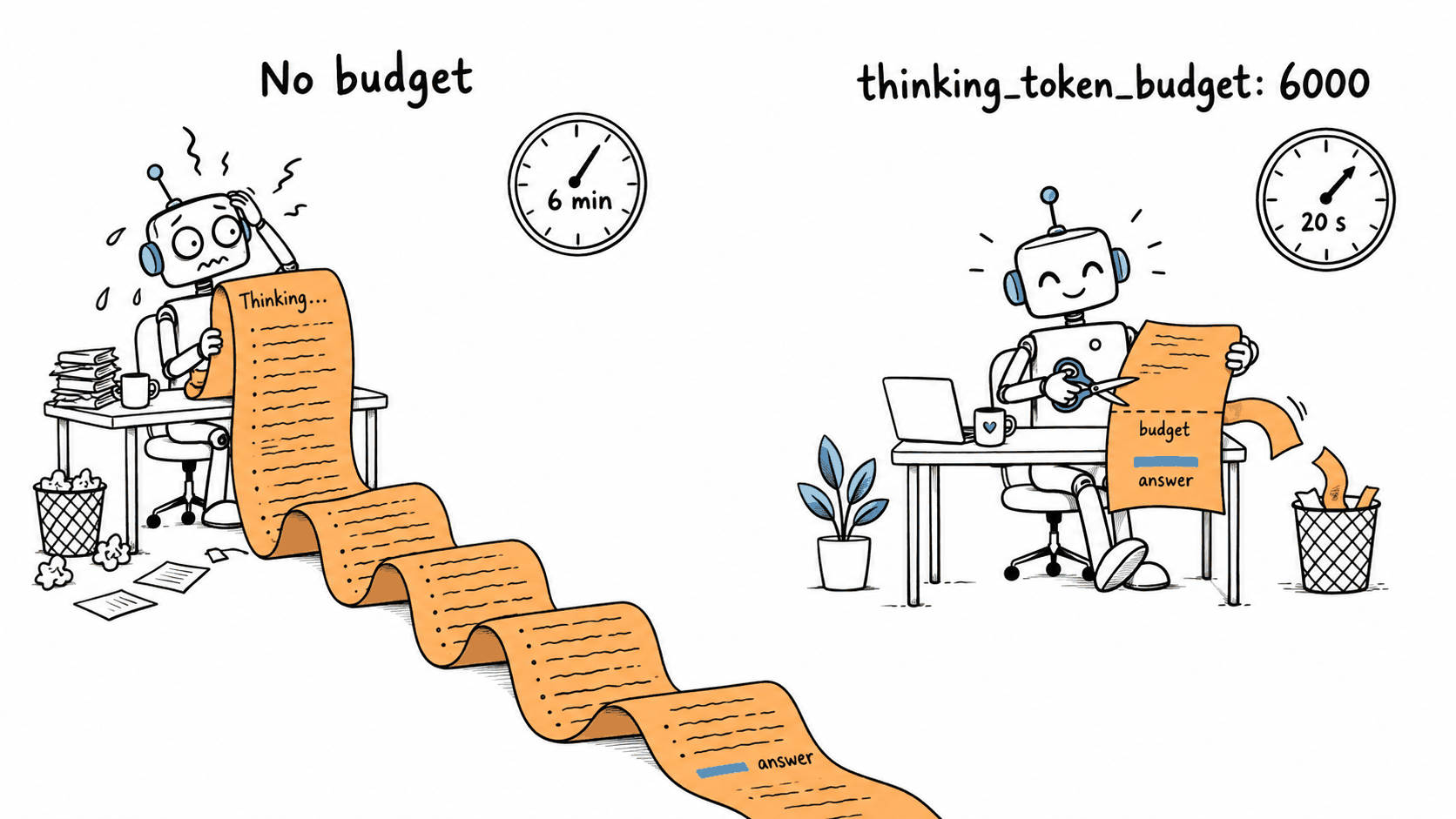
With a default effort of medium and a 6,000-token budget:
| Before | After | |
|---|---|---|
| Average reply length | 2,481 tokens | 867 tokens |
| Slowest 10% of turns | 390 s or more | 77 s or more |
It was the biggest improvement from any omp setting that day. I’ve since raised the budget to 7,500 and run subagents at low effort.
Files got written halfway 🔗
A few turns ran for minutes and produced nothing useful. maxTokens, omp’s limit on how long a single reply can
be, was the cause. It was set to 8,192, and that limit covers the thinking, the visible answer and the contents
of any file the agent writes through a tool call. With 6,000 tokens of thinking, only about 2,200 were left for
everything else, while a file of about 8,000 characters needs 2,500-3,000 tokens.
Six replies stopped at exactly 8,192 tokens in the middle of writing a file. The server reported them as finished tool calls rather than as cut off, and omp patched up the broken output and ran the call anyway. Two files were saved half-written with a “Successfully wrote” message, and four other calls failed with confusing errors that sent the agent off in the wrong direction.
Set maxTokens to 32,768. Thinking is still capped by the budget, so the higher limit only gives answers and
file writes room to finish. In the next run with 32,768 there were no truncated writes, including two replies of
10,286 and 13,964 tokens that would have been cut off before.
Tool outputs flooded the conversation 🔗
Everything a tool returns becomes part of the prompt the model has to prefill. omp keeps a tool result inline unless it’s larger than 50 KB, so the worst turns added three to five results of about 40,000 characters each, and 10-50 seconds of prefill before the model could reply.
I dropped the artifact limit to 5 KB and the agent kept working. Tool output per turn halved, and the agent went back for the full version of only 14-17% of the shortened results. I run 10 KB now, for the limit and for the head and tail kept inline, which is still a fifth of the default.
The agent kept “forgetting” what it had just read 🔗
A few times an hour, a turn that should have been almost entirely cached came back mostly uncached and took minutes to produce its first word. The cache only helps when the new prompt starts with exactly the same text as the old one. If anything near the start changes, even a single character, the server has to prefill everything after that point again.
I caught these changing near the start of the prompt:
- omp’s subagents carry a live list of the other agents and their status (running, idle, parked) in the middle of their instructions. Every status change altered the prompt early. In the worst case, the main agent came back after 24 minutes to a prompt of about 580,000 characters and got only 14% of it from cache.
- Compaction, which is omp summarizing old history when the conversation gets too long, replaces the start of the conversation with a summary, which forces a full prefill by design.
- Tool definitions arrived with their fields in a different order on 8% of turns, even though nothing about the tools had changed. That one turned out to be a bug in Bifrost, the gateway I run between omp and vLLM.
You can’t turn off the live status list, since it’s built into omp’s subagent prompt, but you can make
compaction rare. Tell omp the model’s full context window (262,144 tokens for Qwen3.8), so it doesn’t think the
conversation is full early, and raise the compaction threshold. Also switch on appendOnlyContext. Its
automatic setting only turns on for localhost and private IP addresses, so set it to on if your server has a
normal hostname.
Too many helpers at once 🔗
omp lets up to 32 subagents run at the same time by default. That makes sense against a cloud service with enormous capacity. A home GPU has a fixed prefill rate, and ten subagents that each read big files don’t finish faster than three. They split the same rate ten ways, and every one of them gets slower.
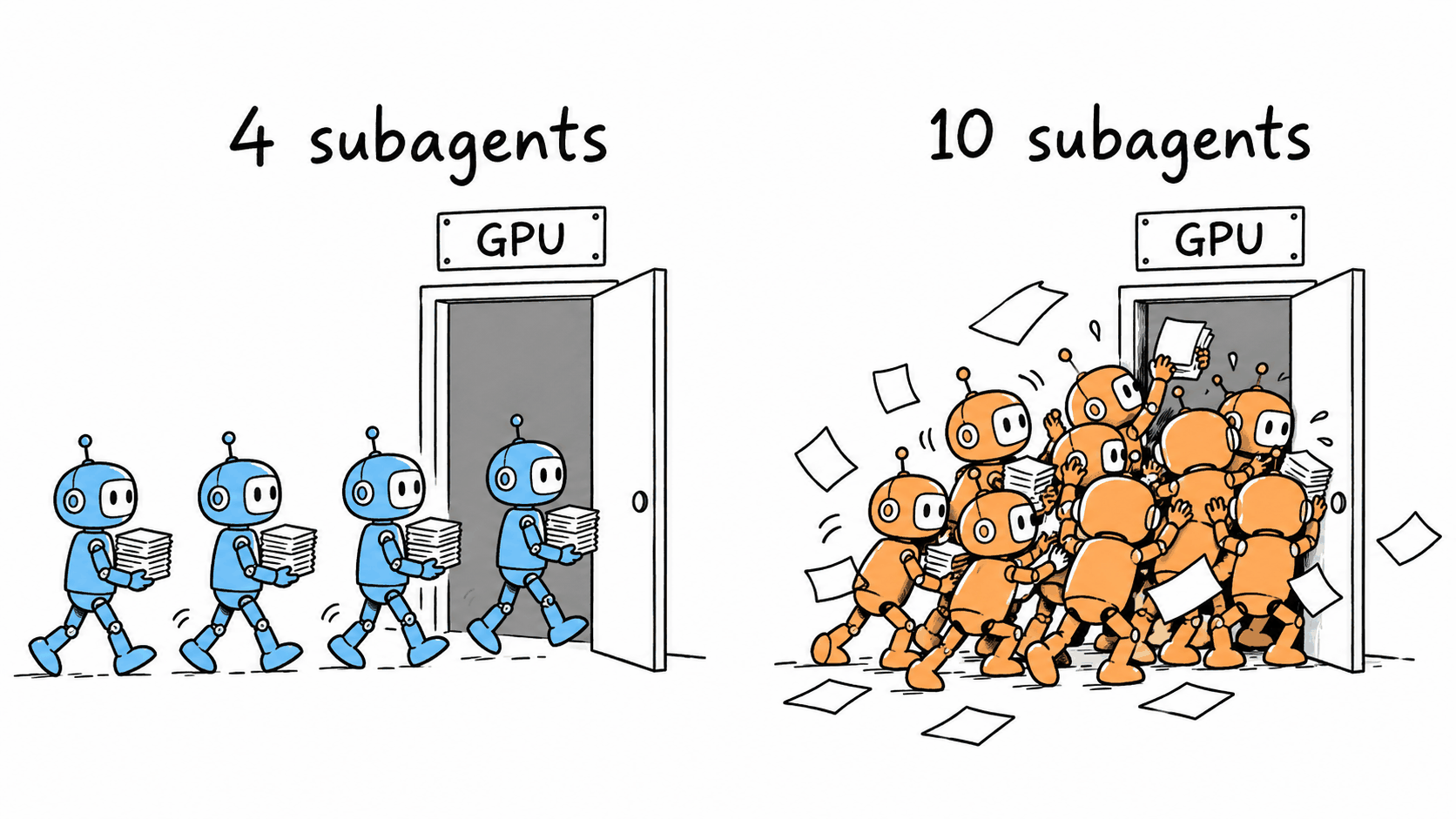
During my best run, the server was busy with only 3 requests at a time and its memory was at most 37% full, so it could have handled more. Agents that mostly read files and run searches spend their time in prefill, so 4 is a good start, and agents that mostly generate code can go a little higher.
Give omp a long timeout for the first word of a reply, because a long conversation waiting behind other work can take a few minutes to start, and giving up throws that work away. If you put anything between omp and the server, also make sure only one layer retries failed requests. Two layers retrying the same slow request doubles the load.
Setting it up yourself 🔗
Hardware and server 🔗
I run Qwen3.8-27B on two used RTX 3090s with 24 GB each, no NVLink, in ordinary PCIe slots. The model is a 4-bit version (W4A16 AutoRound) sized to fit on a single 3090. I split it across both cards. Each card only has room for about 2-3 long agent conversations at a time, so keep the number of parallel subagents low.
For the server, anything that offers an OpenAI-compatible API will do. I use vLLM with the syv-ai image built for RTX 3090s. This post treats the server as a black box.
Install omp 🔗
Any of these works:
curl -fsSL https://omp.sh/install | sh
brew install can1357/tap/omp
bun install -g @oh-my-pi/pi-coding-agent
Point omp at your server 🔗
omp reads custom providers from ~/.omp/agent/models.yml. This is a single local provider based on the model
entry I use every day. Replace the address with your server’s, and make the id match the model name your
server reports.
providers:
  local:
    baseUrl: http://localhost:8000/v1  # OpenAI-compatible URL
    auth: none                         # no API key locally
    api: openai-completions
    models:
      - id: qwen3.8-27b          # the name your server serves
        name: qwen3.8-27b
        contextWindow: 262144    # full window, late compaction
        maxTokens: 32768         # thinking plus big file writes
        reasoning: true
        # only behind Bifrost, see below
        # headers:
        #   x-bf-passthrough-extra-params: "true"
        thinking:
          mode: effort
          efforts: [low, medium, xhigh]
          defaultLevel: medium
        compat:
          extraBody:
            thinking_token_budget: 7500  # needs server support
Run omp models local to check that omp can see the model. If you put a gateway in front of the server, check
that it passes extra request fields through. I run Bifrost, which silently dropped thinking_token_budget until
omp sent the x-bf-passthrough-extra-params header shown commented out above. With omp talking to vLLM
directly, leave the header out.
Note, September 23, 2026: an earlier version of this entry had timeout: 900. omp has no per-model
timeout key and ignored it. The two stream timeouts in config.yml below are the ones that apply.
Tell omp how to use it 🔗
The rest goes in ~/.omp/agent/config.yml. This sets an effort level per role, so hard jobs get more thought
and mechanical ones get less. The :level suffix on a role selector wins over the model entry’s defaultLevel
and over defaultThinkingLevel, which only apply to requests without one. To send a role to a hosted model
instead, replace its selector with that provider’s model.
modelRoles:
  default: local/qwen3.8-27b:medium  # the main agent
  plan: local/qwen3.8-27b:xhigh      # plan mode, think hard once
  slow: local/qwen3.8-27b:xhigh      # reviewer
  task: local/qwen3.8-27b:low        # general subagents
  smol: local/qwen3.8-27b:low        # scouting, simple edits
  tiny: local/qwen3.8-27b:low        # titles, memory, background
  commit: local/qwen3.8-27b:low      # commit messages

defaultThinkingLevel: low  # requests no role covers

task:
  maxConcurrency: 4  # subagents at once, fewer on one GPU

tools:
  artifactSpillThreshold: 10  # KB, bigger results go to a file
  artifactHeadBytes: 10       # KB of the start kept inline
  artifactTailBytes: 10       # KB of the end kept inline

compaction:
  thresholdTokens: 200000  # summarize only when nearly full

provider:
  appendOnlyContext: "on"  # only add to the conversation

providers:
  streamFirstEventTimeoutSeconds: 900  # 15 min for first word
  streamIdleTimeoutSeconds: 900        # and for pauses in a reply
Checking that it works 🔗
The first turn of a new conversation is usually the slowest, because little of it is cached yet. After that, turns should start within seconds even as the conversation grows past 100,000 tokens. If a turn deep into a long conversation takes minutes to start, something near the start of the prompt changed, most likely compaction or a new subagent joining.
If your server shows how many prompt tokens came from cache, watch that number. Mine went from 55% to 95%.
Investigate any sudden drop. A reply whose length equals maxTokens while the agent is writing a file probably
means that file was cut off.
I had help with this one. Anthropic’s Claude and the local Qwen models described here helped me set up and tune the servers, dig through the traffic and draft this post. I ran the experiments, read all the words, checked the numbers and rewrote anything that sounded like a chatbot, so the mistakes are mine.
Sources 🔗
- Oh My Pi (features, providers, roles, hashline edits)
- omp model configuration and settings: models.md and settings.md
- Pi coding agent
- Claude Code with LLM gateways (non-Claude models not supported)
- Codex configuration reference (
model_providers,wire_api,--oss) - OpenCode providers and models: providers and models
- Qwen3.8-27B model card, chat template and the
xhighdefault effort - Thinking-level cost comparison (community)
- Model weights
- syv-ai RTX 3090 vLLM image
- vLLM reasoning outputs and
thinking_token_budget - vLLM PR #47963 (open), truncated tool calls reported as complete